
Ab PDF Splitter2.8.6.1 - Download
You'll be able to download in few seconds.
Publisher Description
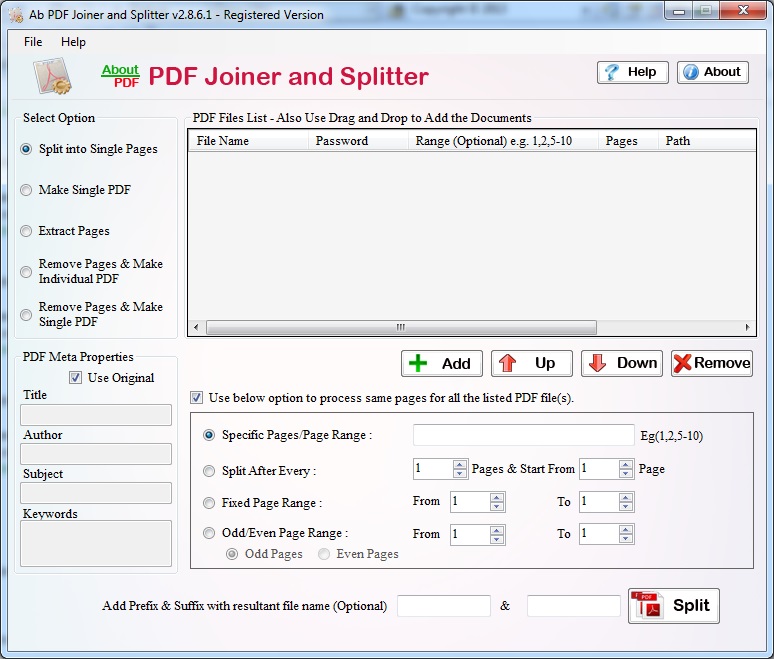
PDF Splitter is very simple but most useful software for PDF user. Application support most of all basis operation like split, merge, join, divide, delete, combine, compare, add, append, concatenate, cut, break, remove, extract etc. Tool has option to split large PDF file into number of pages and create single PDF file from operated pages. User allows removing blank, useless and corrupt PDF pages between of PDF file. Utility allow to set conditions time of performing procedure such conditions are specific pages, page range, fixed page range, odd/even pages. Program has option to set PDF Meta Properties like title, author, subject and keyword. You can set user define name time of saving PDF file.
Features:
* Application mainly split and merge PDF document into several manner.
* User can use extra usual option like divide, join, delete, extract, combine, compare, add, append, concatenate, cut, break, remove etc.
* Split huge PDF file number of pages.
* Extract required PDF pages.
* Compare two PDF file as well as pages.
* Set PDF Meta Properties like title, author, subject and keyword.
* Set conditions (page range, specific pages, odd/even pages) time split, merge, delete and extract PDF document.
* Support both 32 and 64 bit operating system.
* Support all Window operating system like Vista, XP, NT, Win2000, Win7 and Win8.
About Ab PDF Splitter
This Office Suites & Tools program is available in English. It was last updated on 29 September, 2026. Ab PDF Splitter is compatible with the following operating systems: Other, Windows.
The company that develops Ab PDF Splitter is PDF Splitter. The latest version released by its developer is 2.8.6.1.
The download we have available for Ab PDF Splitter has a file size of 1.0 MB. Just click the green Download button above to start the downloading process. The program is listed on our website since 2014-07-23 and was downloaded 0 times. We have already checked if the download link is safe, however for your own protection we recommend that you scan the downloaded software with your antivirus. Your antivirus may detect the Ab PDF Splitter as malware if the download link is broken.
How to install Ab PDF Splitter on your Windows device:
- Click on the Download button on our website. This will start the download from the website of the developer.
- Once the Ab PDF Splitter is downloaded click on it to start the setup process (assuming you are on a desktop computer).
- When the installation is finished you should be able to see and run the program.
Program Details
System requirements
Download information
Pricing
Version History
version 2.8.6.1
posted on 2014-07-23
Adding new features to split, merge, delete, extract, combine, compare, join and concatenate PDF files into one using several standard behaviors
Disclaimer
External Download
We do not host Ab PDF Splitter on our servers. We did not scan it for viruses, adware, spyware or other type of malware. This app is hosted by the software publisher and passed their terms and conditions to be listed there. We recommend caution when installing it.
The external download link for Ab PDF Splitter is provided to you by apps112.com without any warranties, representations or guarantees of any kind, so access it at your own risk.
If you have questions regarding this particular app contact the publisher directly. For questions about the functionalities of apps112.com contact us.
